
What is Smartsheet used for?
Smartsheet is an established project management tool that functions like a spreadsheet but incorporates collaborative features, automation, and workflows that connect teams. Although it was formerly considered the “best deal” available, cost increases and shifts in pricing models have now made the software exceed market prices. Excel users will be familiar with its grid-first design. These qualities make it best for day-to-day task tracking and simple project management.
However, Smartsheet’s scheduling, dependency management, and resource management capabilities are lighter than many Project Portfolio Management (PPM) platforms, making it unsuitable for true program or portfolio management.
What are the advantages of using Smartsheet?
Smartsheet is an easy way of transitioning from Excel to a similar, cloud-based platform. Choosing the platform allows you to remain in a familiar environment, although you are sacrificing the option of a long-term solution for PPM. Advantages of the platform include:
- A spreadsheet-like interface that’s easy for non-project managers and cross-functional collaborators to use.
- The ability for individuals, teams and organizations to design and build their own platform, although they will have to do all the legwork.
- Suitability for informal project management, where teams want something more robust than Excel and don’t anticipate having program or portfolio management use cases.
- Automation features like alerts, reminders, and approval workflows that reduce repetitive tasks.
- The ability to attach files and comments directly to rows makes collaboration more intuitive than email chains.
- Robust partner ecosystem for implementation and professional services needs.
What are the limitations of Smartsheet?
While it’s a good fit for task tracking, Smartsheet struggles with PPM use cases like resource management, critical path analysis, earned value, and portfolio governance. Other drawbacks include:
- Resource management is lacking: Smartsheet requires one role or person to be allocated per task in a schedule, requiring PMs and Resource Managers to use work-arounds for multi-user allocation (a feature readily available in most PPM solutions).
- The open, highly editable structure makes it easy for users to modify formulas, dependencies, or data fields—introducing data inconsistency and manual errors over time, especially across shared sheets.
- When working with large projects or datasets, a common practice in a PMO or scaled-up project organization, users can experience slower load times and interface lags.
- Advanced functions such as Workload Management, Data Shuttle, Dynamic View, and Control Center are gated behind higher-tier plans.
- A steep learning curve for advanced formulas, automation, and cross-sheet logic, especially for teams not familiar with Excel-style formulas, means much of Smartsheet’s higher-level functionality is left untouched except for a few power users.
- Professional services are often required to enable PPM-like capabilities; there are no real portfolio, program, or project management data model capabilities without significant effort to design information flows to accurately aggregate reports and dashboards.
- Smartsheet’s new per-user pricing model forces payment for all editors, driving unexpected 30–50% cost increases and exceeding market prices for PM and some PPM software.
What are users saying about Smartsheet?
“It can be very hard to follow the flow of information through Smartsheet. Between forms, automations, archiving workflows, and formulas, we have found it hard to track ownership of assets and the sources of certain pieces of information. We have resources that don’t appear to be owned by anyone and SS has not been able to track them down, we have lost assets with team members leaving that we did not know would disappear. It can also be difficult to utilize the formulas—I have found there are many limitations to the formulas that are not intuitive to an experienced Excel user.” (G2)
Who is Smartsheet best for and when to choose it? Prism PPM vs Smartsheet
Smartsheet is best suited for project teams familiar with working in Excel and want a similar grid-like interface with added collaboration, automation, and dashboards. It’s ideal for teams that need lightweight project tracking and workflow triggers across departments, but it is not well-suited for the unique needs of a departmental PMO, EPMO, or Transformation Office.
Choose Smartsheet if your organization values flexibility, spreadsheet familiarity, and building-block automation. It’s a good fit for low-maturity project management groups, informal project managers, or cross-functional teams looking to collaboratively manage their work.
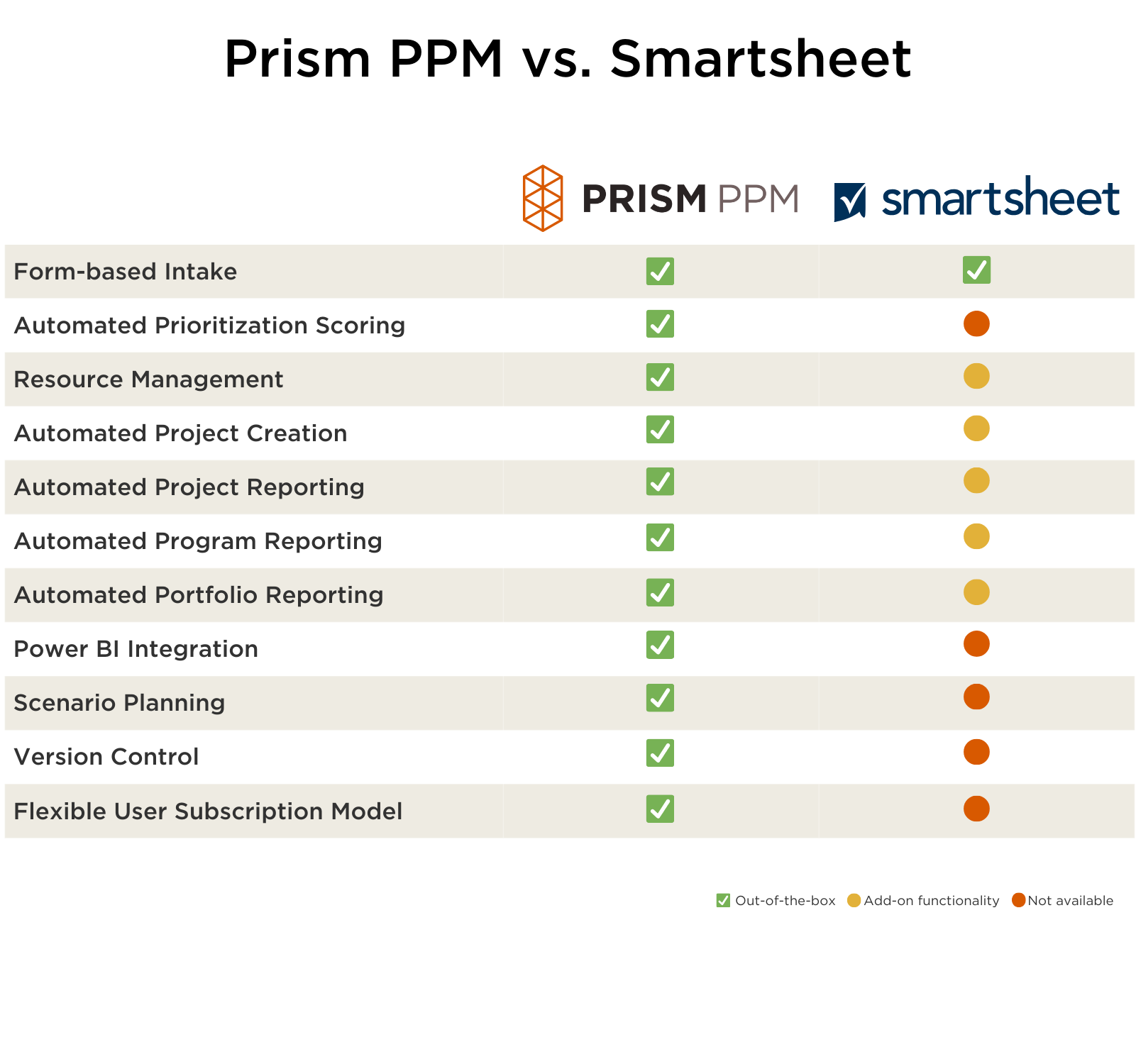
In contrast, Prism PPM is a great alternative to Smartsheet for project portfolio management and PMO use cases. Prism PPM is ideal for project teams that need to level up, have reached the upper limit of what spreadsheets can provide, and want to “graduate” to the next level of capability in dependency management, scenario planning, budget and fiscal control, investment decision-making, and resource allocation. Add to that Prism PPM’s best price to value on the Gartner Magic Quadrant and you have a solid choice for project portfolio management.
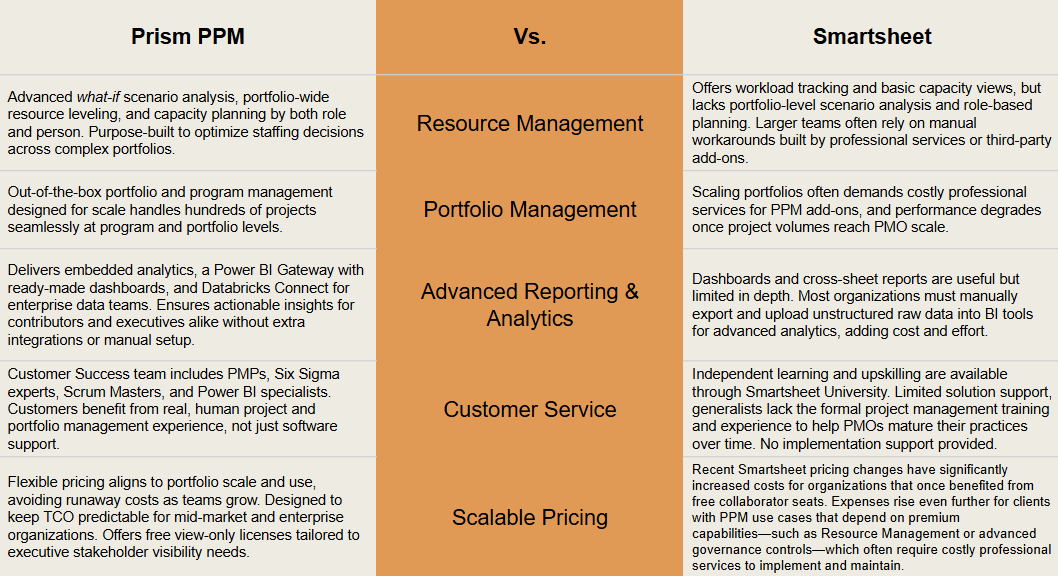
The Verdict
Prism PPM is purpose-built for aggregating project data and managing programs and portfolios. Unlike Smartsheet’s spreadsheet-style collaboration, Prism PPM provides robust resource scenario planning, portfolio resource leveling, executive-ready reporting, and a PMP-accredited Customer Success team, making it a better fit for PMOs and transformation teams.