TL;DR
The era of the “Process Trap” is ending. In 2026, PMOs must transition from simple delivery to strategic leadership. With only 18% of project professionals currently demonstrating high business acumen, the right tool is a requirement for survival.
- Move Beyond CWM: While collaborative tools (like Monday or ClickUp) are great for tasks, they lack the portfolio visibility and capacity forecasting needed for enterprise growth.
- Drive Outcomes, Not Status: High-maturity PPM solutions enable “What-if” scenario planning and strategic alignment that spreadsheets cannot replicate.
- The Best for 2026: We evaluated the top 10 solutions, including enterprise leaders like Prism PPM, Wrike, and Smartsheet, to find the best fit for organizations ready to level up.
10 Best Project Portfolio Management Software
Just 18% of project professionals show “high business acumen,” according to the 2025 PMI Pulse of the Profession report.
In 2026, that’s no longer just a stat: it’s a breaking point. If PMOs continue to prioritize delivery mechanics over business outcomes, they risk becoming obsolete.
Transitioning to a strategic role requires more than just a mindset shift; it requires a toolkit designed for strategic portfolio optimization. You cannot drive the enterprise forward if you are buried in basic task management.
In this comprehensive PMO software comparison guide, we’ll explore the 10 best project portfolio management software solutions for 2026.
What Is Project Portfolio Management Software?
Project portfolio management (PPM) software is a comprehensive platform that allows you to manage project portfolios and ensure proper prioritization and strategic alignment with company goals. It includes tools for strategic alignment, resource allocation and optimization, data analysis and reporting, and risk reduction.
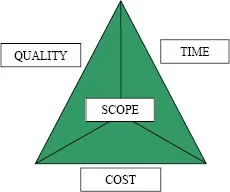
The best project portfolio management software enables you to move beyond the Iron Triangle, which focuses on how the factors of scope, time, and cost are interdependent. Instead of solely looking at these factors, today’s PMOs must be flexible and maximize ROI through strategic alignment with the organization’s overarching objectives.
With PMO expectations evolving, you need the tools that allow you to increase efficiency and productivity, maintain visibility over your projects and portfolios, minimize risks, prioritize effectively, stay compliant, and bridge planning and value delivery. Your platform must also provide a central repository for communication, collaboration, and access to key data.
PPM vs CWM vs SPM Software
PPM, collaborative work management (CWM), and strategic portfolio management (SPM) software solutions serve different business needs.
CWM focuses on the collaboration, communication, and coordination of projects; SPM concentrates on high-level portfolio alignment with long-term goals and objectives; and PPM ensures the proper execution and delivery of projects while meeting these goals.
PPM is typically the most comprehensive solution, encompassing both CWM and SPM functions along with a roadmap for executing projects.
How to Choose the Best Project Portfolio Management Software
When you’re selecting PPM software, you should consider whether you need a comprehensive solution or a simpler task management platform like a CWM. Most organizations dealing with portfolios as opposed to discrete projects will need an actual PPM platform. Look for essential features like:
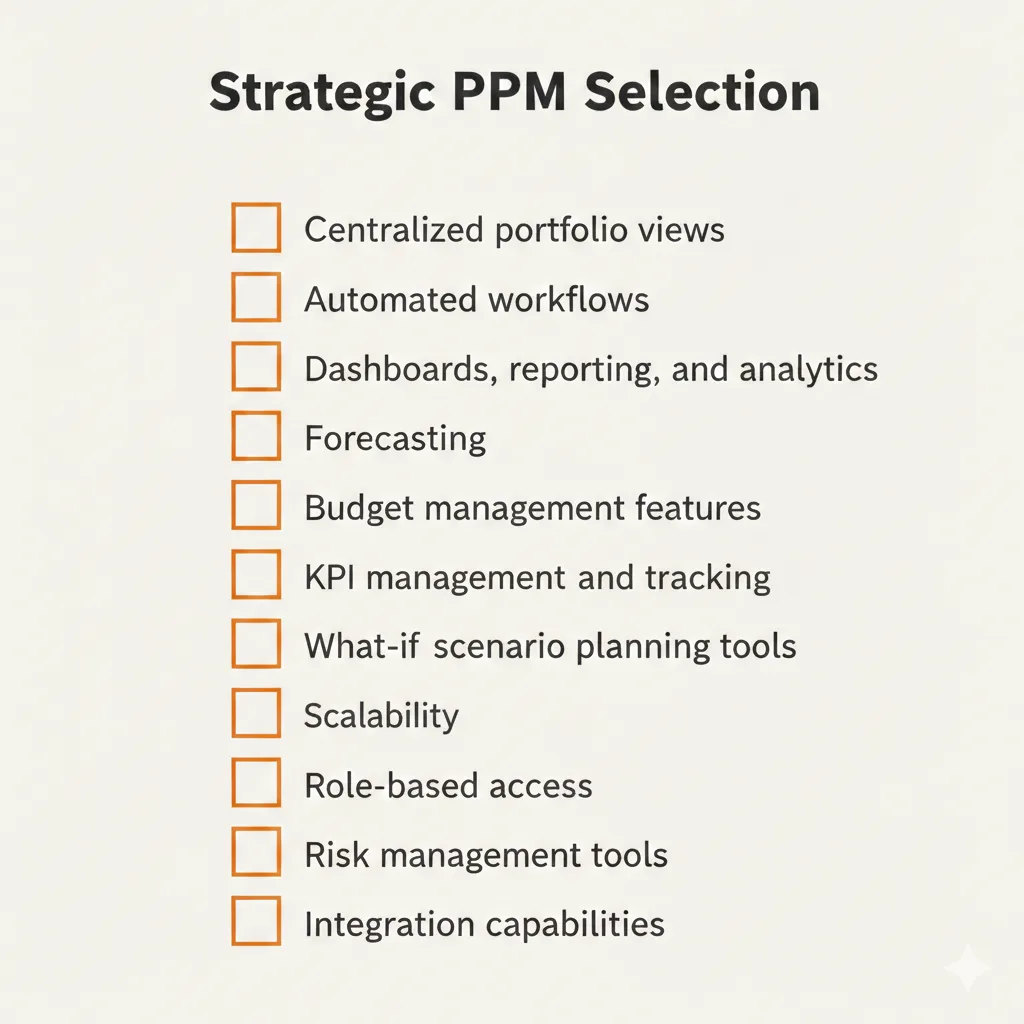
In addition to these features, look for a user-friendly platform that delivers a strong ROI. You want a tool that combines all the features you need into one centralized platform to connect strategy with execution.
PMO Software Comparison: 10 Best Project Portfolio Management Software
Prism PPM
Pricing: $20 a month per user for a Standard plan. (See full pricing alternatives)
A comprehensive project portfolio management platform, Prism PPM is ideal for PMOs grappling with multiple projects and portfolios. The customizable software is easy to use and comes equipped with interactive Gantt charts, task management tools, forecasting tools, dashboards, capacity planning, strategy mapping, and a “What If?” scenario planning features that allows teams to visualize various resourcing situations.
Prism PPM is ideal for businesses looking for an exhaustive, all-in-one solution for managing complex project portfolios and making data-driven decisions to reach their strategic goals.
Pros
- Portfolio-level resource and capacity planning
- Seamlessly integrates with applications like JIRA, Excel, and Microsoft Office
- Mobile accessibility
- Extensive customer support
- Designed for strategic alignment
- What-if scenarios
- Embedded analytics and Power-Bi Gateway
Cons
- Less suitable for smaller teams looking for just project management tools
- Initial setup time is more comprehensive, so it may take longer
Monday.com
Pricing: $19 monthly per user for a Pro plan.
Monday is a customizable, cloud-based CWM platform for managing workflows across teams of varying sizes. It offers abundant features, including automation for repetitive tasks, and task management, visualizations.
Monday is ideal for teams managing multiple projects simultaneously, although it is less of a full-scale PPM platform and more of a collaborative work management tool that can be adapted for portfolios with several limitations.
Pros
- Scalable for multiple team sizes
- Multiple visualizations of project progress
- Many integrations and automations
- Highly customizable with hundreds of templates
Cons
- Many features, such as advanced reporting tools, are only available with higher-priced plans
- Mobile app has limited functionality
- No strategic alignment
Learn more about the differences between Monday.com and Prism PPM, and what’s the solution that best fits your goals in our Monday vs. Prism PPM article.
Workday
Pricing: Available upon request.
Geared toward HR professionals, Workday is a cloud-based solution for Human Capital Management (HCM), workforce planning, and enterprise planning. It centralizes data and reporting and provides tools for functions like time tracking, talent management, and analytics, using AI to automate processes.
By combining key functions into a single platform, Workday provides real-time insights into performance and reduces manual labor associated with common processes.
Pros
- Ideal for HR and finance teams at large companies
- Unifies data in a centralized platform
- Provides real-time analytics
- Offer helpful notifications
- No strategic, portfolio-level alignment for PMOs
Cons
- Steep learning curve and difficult to navigate
- Less robust mobile app experience
- Not well suited to holistic PPM functions
- Overwhelming for smaller businesses with simpler requirements
- Limited customization
Clickup
Pricing: $12 monthly per user for a Business plan.
Clickup is a customizable PPM tool that centralizes key data and processes into a single platform. Offering ample automation capabilities, the platform supports Gantt charts, Kanban boards, calendars, and dashboards and provides features like real-time reporting, collaborative documents, templates, whiteboards, and mind maps.
Clickup is a versatile tool that’s ideal for SMBs managing multiple projects, helping them plan, manage, track, and optimize their initiatives.
Pros
- Highly customizable interface and views
- Comprehensive set of features
- Strong automation capabilities
- Ideal for portfolio management
Cons
- Steep learning curve
- Complex and long onboarding process
- Mobile app problems and limitations
- Performance problems
Kantata
Pricing: Available upon request.
Suitable for resource-intensive professional services organizations, Kantata offers task management, capacity planning, resource management, real-time visibility, and user-friendly dashboards.
Kantanta is highly flexible and scalable and is equipped with features like real-time analytics, Gantt charts, employee scheduling, and a full suite of integrations.
Pros
- AI-driven resource management features
- Clean, easy-to-navigate interface
- Intuitive task management
- Strong collaboration features
Cons
- Complex onboarding and implementation
- Limited PMO-level PPM features
- Mobile app is difficult to navigate
- Long response times from customer service
- Can be overwhelming for smaller teams
- No strategic portfolio alignment
Wrike
Pricing: $25 monthly per user for a Business plan.
Wrike is a comprehensive PPM and resource management solution. It is ideal for task and performance monitoring, resource optimization, collaboration, and streamlining workflows. The platform is strong for capacity planning and integrates well with other software solutions.
Wrike is customizable and allows users to create unique workflows and templates. It also offers numerous features, such as interactive Gantt charts, easy file sharing, and built-in time tracking.
Pros
- User-friendly for seasoned professionals
- Ideal for enterprises
- Well-suited for team collaboration
- Strong task management capabilities
Cons
- Resource management features are limited
- Feature add-ons are expensive
- No strategic portfolio alignment for PMOs
Screendragon
Pricing: Available upon request.
Targeted to marketing and professional services agencies, Screendragon is a work management solution for centralizing projects and operations. The tool features customizable workflows and a high level of visibility for teams.
Screendragon allows you to see capacity management issues and opportunities for improvement, thanks to comprehensive reporting and visibility.
Pros
- Highly customizable
- Integrates well with third-party tools
- Suitable for larger organizations grappling with complex processes
- Strong customer support
Cons
- Complex setup and steep learning curve
- Some performance issues
- No dedicated mobile app
- No strategic portfolio alignment for PMOs
Smartsheet
Pricing: Custom
Smartsheet is designed to support teams in project planning, automating, tracking, and reporting through a familiar spreadsheet-like interface. The tool provides key features like portfolio visibility, resource management, task allocation, and schedule maintenance.
The platform is particularly useful for teams transitioning from Excel to a more robust project management system with greater functionalities.
Pros
- Familiar interface for teams accustomed to using spreadsheets
- Highly flexible
- Offers customizable templates and tools
- Integrates with many third-party tools
Cons
- Less suitable for complex PPM and PMOs needs and goals
- Limited resource management capabilities
- Fewer advanced features like built-in time tracking
Learn more about the differences between Smartsheet and Prism PPM, and what’s the solution that best fits your goals in our Smartsheet vs. Prism PPM article.
Resource Guru
Pricing: “Blackbelt” plan is $6.65 per user per month.
Featuring a drag-and-drop interface, Resource Guru is a resource management platform geared toward project managers at SMBs. It is ideal for teams looking to streamline their projects and maximize their resources and productivity.
Resource Guru has detailed resource allocation and optimization capabilities, along with features like advanced reporting and easy scheduling.
Pros
- Simple, user-friendly tool
- Clash Management tool helps prevent users from overbooking
- Intuitive interface
- Visibility facilitates better coordination and collaboration
Cons
- Lacks comprehensive project and portfolio management features
- Limited customization capabilities
- Task management features are very basic
- Lacks built-in communication tools
Parallax
Pricing: Available upon request.
Targeted to professional services agencies and digital agencies, Parallax is a resource management platform that helps teams with project planning, resource allocation, forecasting, and data-driven decision-making.
Parallax acts as a central source of truth for resource planning and revenue forecasting, bringing heightened visibility to teams across industries.
Pros
- Integrates with other PM and collaborative platforms
- Ideal for capacity forecasting and resource allocation
- Can autofill roles
- Provides ample data and insights into capacity
Cons
- Lacks comprehensive project management capabilities
- Steep learning curve
- Lacks features included in PPM platforms like time tracking and financial reporting
- Complexity makes it less suitable for smaller businesses
Conclusion
The era of the PMO as a “bureaucratic layer” is over. In 2026, executive leadership will no longer tolerate a focus on “business as usual” while strategic goals sit on the sidelines. To bridge the gap between execution and outcomes, you must move beyond the delivery mechanics of simple task managers and embrace a platform that provides true strategic visibility.
We’ve evaluated these 10 PPM software solutions because each offers a different path out of the “process trap”. However, the right choice for your organization is the one that transforms your PMO from a reporting center into a value-driven business partner.It’s time to stop just managing projects and start driving the enterprise forward. Risk less, realize more, and lead with Prism PPM. Get your demo.