
TL;DR
Effective portfolio reporting provides PMOs with a holistic view of all projects. It focuses on strategic alignment, resource allocation, risks, and budgets to drive transparent, data-informed decision‑making across the organization and meet the organization’s strategic objectives.
Project Portfolio Reporting
Project portfolio reports are a critical success factor for project management offices (PMOs). The process keeps everyone informed, provides visibility into key success metrics, and creates alignment with business goals. Relying on standardized reporting builds trust in project portfolio data.
Here, we will walk you through how to create project portfolio reporting that is effective, timely, and relevant and has real business impact—no matter how many projects you have on your plate.
Project Portfolio Reporting: What It Is and Why It Matters
Project portfolio reporting is strategic documentation that provides a comprehensive overview of all ongoing and planned projects.
A project portfolio report includes a project name, ID, and sponsor and covers critical project information, offering insights into project status, resource allocation, budget utilization, timelines, and strategic alignment.
Unlike project-specific reports, reports covering the entire portfolio go beyond simple project performance tracking and reporting to enable:
- Monitoring strategic alignment: Ensuring that all projects are aligned with the organization’s goals and objectives, preventing resource allocation to initiatives that don’t contribute to the overall strategy.
- Optimizing resources: Providing a holistic view of resource allocation across all projects, these reports help identify overallocation or underutilization, enabling more efficient resource management.
- Managing risk: Highlighting potential risks across multiple projects, allowing for proactive risk mitigation strategies at a portfolio level.
- Providing support for key decision-making: When teams have data-driven insights they can readily make go/no-go decisions for new projects and help prioritize existing ones based on their strategic value and performance.
What are some common types of project portfolio reports?
While every Project Management Office is different, the types of reports you need to stay on top of the project portfolio management (PPM) process and portfolio reporting are fairly standard:
- Status reports: These reports are used for tracking projects’ progress, issues, and updates by project.
- Risk reports: Highlighting project risks and mitigation plans is an ongoing process helped by regular reporting.
- Financial reports: Monitoring budget, expenses, and financial health keeps projects aligned from a budget and benefits realization standpoint.
- Resource management reports: Staying ahead of potential staffing issues is done by tracking resource utilization and capacity.
- Executive dashboards: These vary considerably by organization but are generally high-level overviews for leadership decision-making.
- Project summary reports: The project summary report below shows a view of all projects and their status.
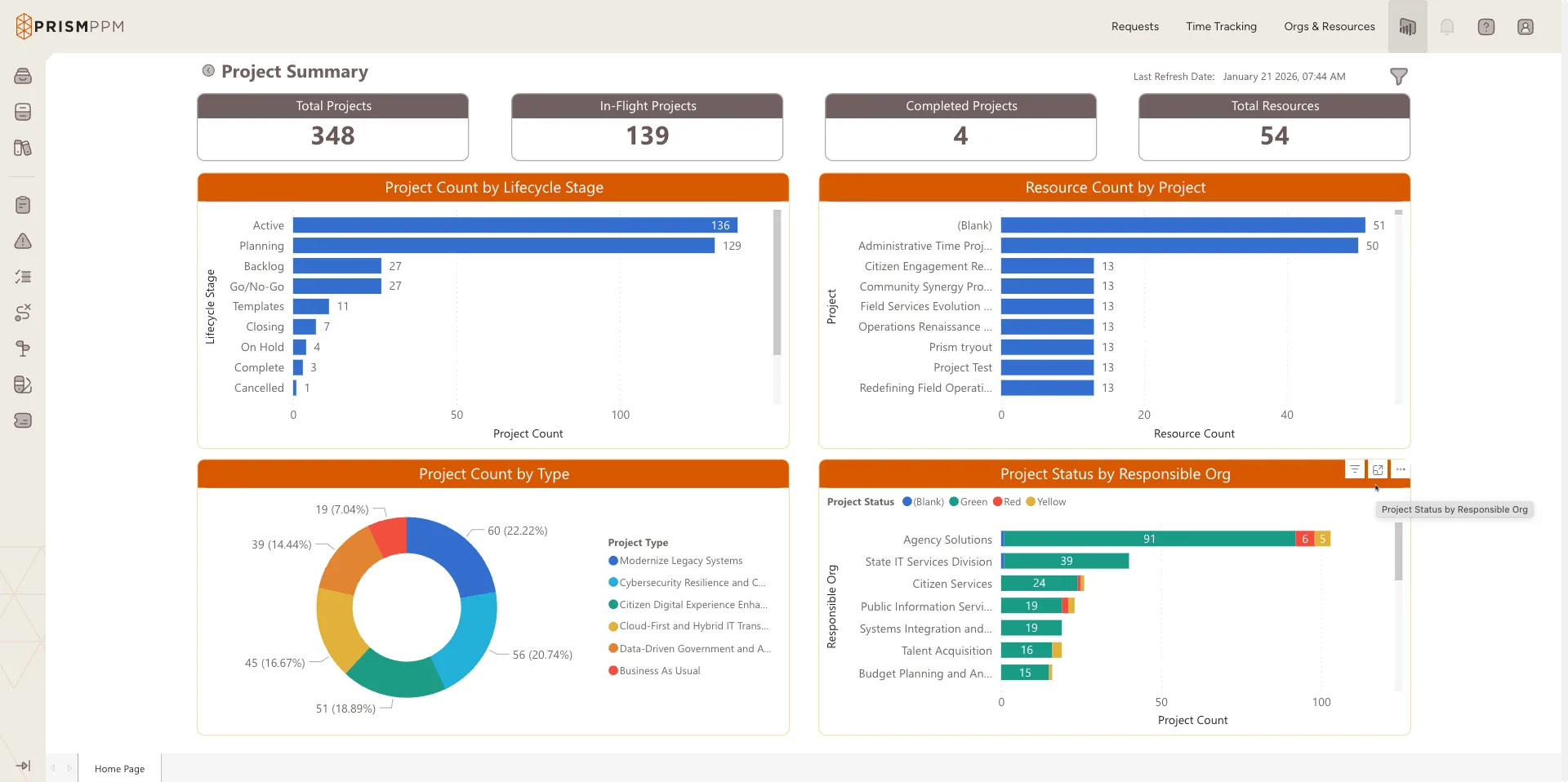
Examples of Key Metrics and Data in Project Portfolio Reports and the Stakeholders They Help
Effective project portfolio reports should include an aggregated set of metrics and data that provide a comprehensive yet focused view of portfolio health and performance. Here’s an expanded list of key elements to include:
| Report Type | Description | Audience |
| Project Status | Indicates project health, including whether it is on track, at risk or delayed | Project Managers, Project Teams, PMO Leaders |
| Budget | Tracks planned vs. actual budget, forecast to completion and cost variance analysis | Project Managers, PMO Leaders, Project Stakeholders |
| Resource | Shows current staffing across projects and utilization, may include skills gap analysis | Project Teams, Project Managers, Resource Managers, PMO Leaders |
| Timeline and Milestone Progress | Provides visibility into progress toward key deliverables and dates, surfaces critical path status | Project Teams, Project Managers, PMO Leaders, Stakeholders, Executives |
| Capacity | Projects resource demand and capacity, surfacing overutilization and shortages | PMO Leaders, Executives, Resource and HiIring Managers |
| Risk Assessment | Indicates potential risks, including probability and impact, to aid in mitigation strategies risk management | Project Managers, PMO Leaders, Project Stakeholders, Executives |
| Financial Assessment | Tracks and projects ROI and financial performance | PMO Leaders, Project Stakeholders, Executives |
| Strategic Alignment Score | A quantitative measure of how well each project aligns with organizational strategic objectives | PMO Leaders, Project Stakeholders, Executives |
| KPI Tracking | Used to track project and portfolio KPIs | Project Managers, PMO Leaders, Executives |
Best Practices for Project Portfolio Reporting
Ensure your reports are effective and actionable by taking into account:
- Is the data accurate and consistent across reports?
- Are you using visual elements like graphs, charts, and dashboards to enhance readability and comprehension?
- Is the report tailored to the audience for which it is intended?
- Is the timing of your reporting adequate to keep everyone involved updated but not overloaded?
- Do the reports reflect a portfolio-wide view with real-time visibility into your data?
Challenges in Project Portfolio Reporting and How to Avoid Them:
The easiest way to get ahead of challenges to effective PPM reporting is to make sure the following questions are answerable:
- How do the metrics influence each other and what are the tradeoffs between competing metrics? For example, an overdue milestone might be acceptable if the team is performing actions that address risk mitigation.
- What specific metrics should trigger action and who is responsible for that action? Determine an escalation plan as part of your project governance strategy.
- How often should reporting be updated to ensure numbers aren’t “stale.”
- Key success metrics can change as the PMO processes mature. How frequently should reporting metrics be assessed?
- What’s the appropriate baseline for comparing data and how do seasonal or external factors affect it?
- How do we avoid information overload and what is the right frequency for reporting? Real-time data is excellent but should be meaningful, not a distraction.
Getting to effective reporting is just one of the important challenges in project portfolio management that PMOs have to tackle. Getting it right, however, is critical to growing and maturing your portfolio alongside your business goals.
How to Automate Project Portfolio Reporting
Creating project portfolio reports is often a manual process, pulling data from disparate sources such as spreadsheets, time-tracking software, financial systems, and project management tools. Many PMO leaders include status reporting as the primary focus of their jobs, yet few have yet to automate the tasks that would help them focus on more important work.
Eliminating data silos is a fundamental benefit of automation and a key component of project portfolio management. The best way to automate reporting is with a tool built for managing and optimizing a project portfolio. A PPM tool like Prism PPM can aggregate portfolio data in a meaningful way, so that every audience has the right cut of the data they need to make decisions more effectively.
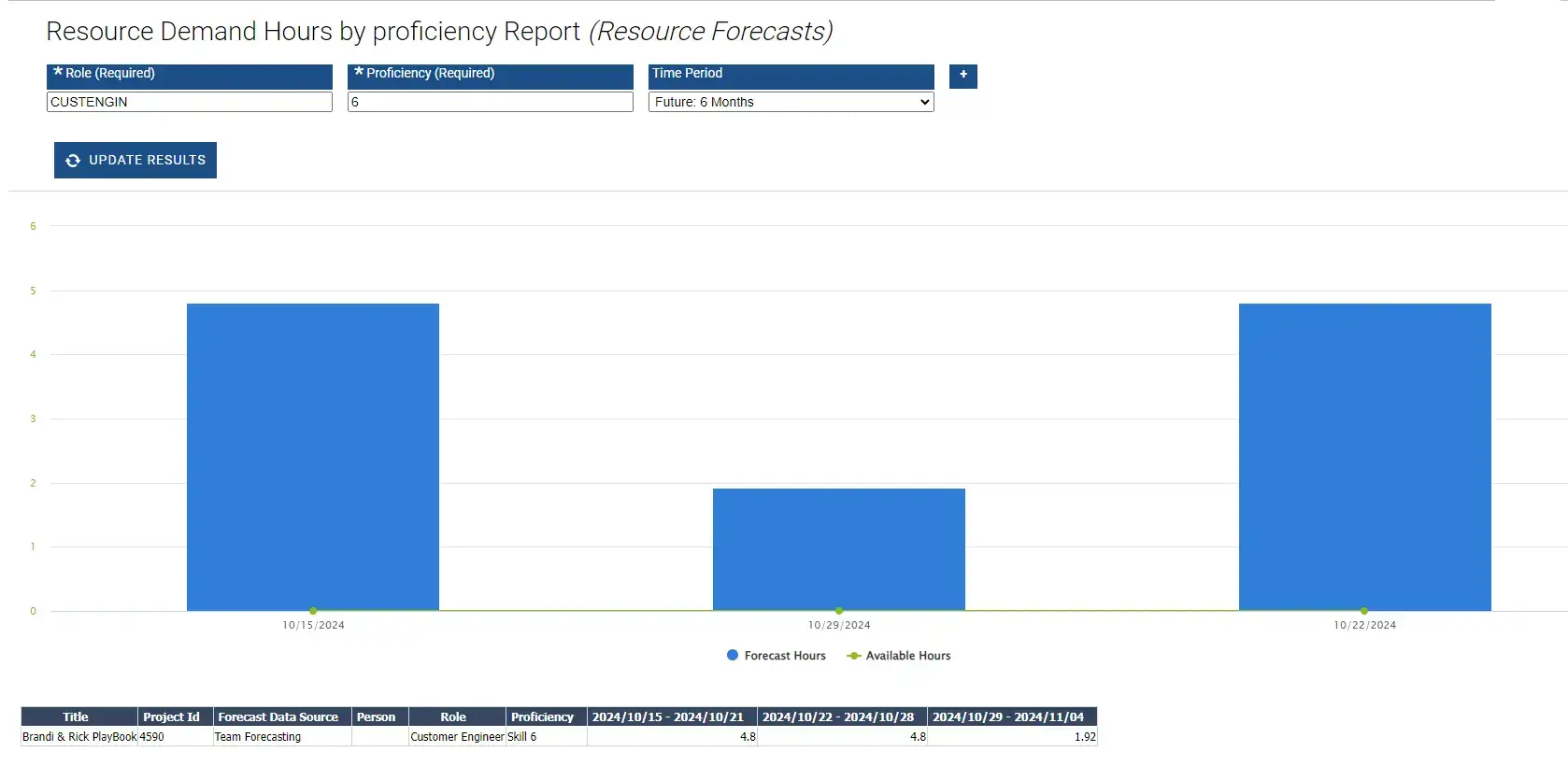
This example of an automated Resource Demand report shows staffing needs by skills type across all projects.
How to create a Project Portfolio Report, a step-by-step guide
Much like a good news report, an effective project portfolio report will tell a story with the data. Here are the steps to follow when setting up your reports:
Step 1: Identify the objectives and audience for the report, keeping in mind that for the data to be actionable, it has to be meaningful to the person who is consuming it.
Step 2: Select the key metrics and data sources to include. For project status reports, this might include a color-coded red, yellow, or green key for a quick read of overall health, as well as a detailed view allowing you to drill into the actual project plan to analyze and address any problems on red projects.
Step 3: Choose the right tool or software for report creation. Will your audience benefit from data-rich reports that allow them to drill into details or is a portfolio dashboard surfacing KPIs more effective?
Step 4: Organize data into clear sections (e.g., financials, performance, and risks), and make sure that the sections work together to tell the story of why something is happening.
Step 5: Incorporate visual aids (charts, graphs, etc.) for enhanced readability and for surfacing potential problems or areas of concern.
Step 6: Review and validate data accuracy before finalizing. This step is critical for manual reports and in automated reporting. Always check your sources!
Step 7: Share reports with stakeholders and gather feedback for improvement. Create a push-pull with your report consumers where you both supply the information to them and get their feedback on how effective the reports are and where they can be improved.
Aligning project portfolio reports with organization strategy
Creating alignment starts with everyone from key stakeholders and executives to project managers and individual contributors understanding the business importance of the projects they’re overseeing and working on. Alignment is critical for meeting business objectives and creating a more strategic PMO. Here are some elements that contribute to reporting alignment:
Implementing these practices ensures that the entire project portfolio remains a dynamic, responsive tool for executing organizational strategy instead of a collection of individual projects.
Examples of Project Portfolio Reporting
Resource Management Reports
Among the most important and impactful types of project portfolio reporting are resource management reports. The PMO needs to show leadership by demonstrating that their highest priority initiatives are achievable (or not) given their existing capacity. A typical RM report might surface monthly % allocation by person or, more commonly, by role or role proficiency. This allows the PMO to understand if they have enough capacity over the next six months, 12 months, or 24 months to complete the work in their pipeline.
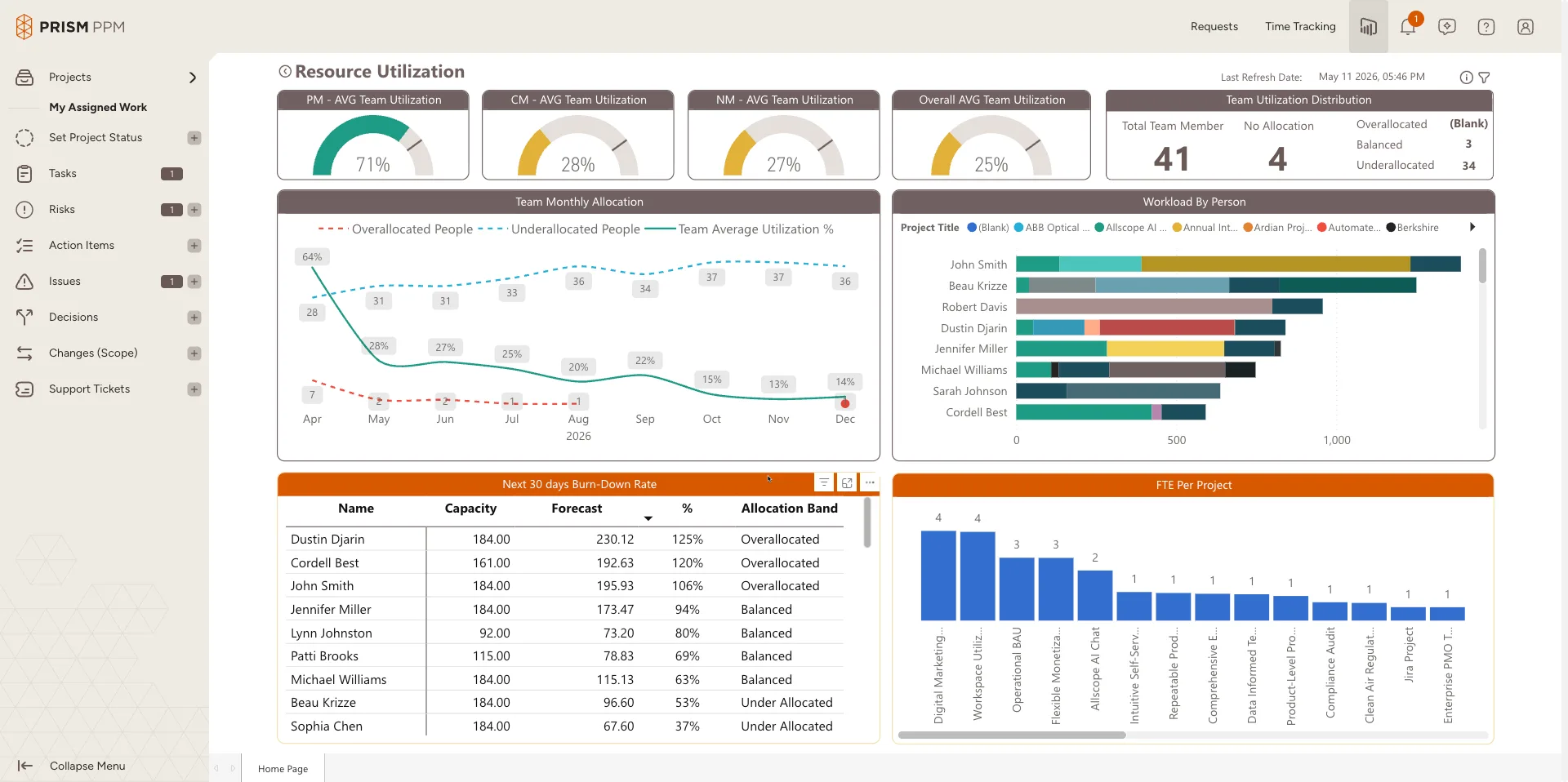
In Prism PPM, you can drill down from high-level Resource Management reports into a role or person to see everything they are forecasted to work on during the specified period.
Business Value Assessment Reports
As discussed, alignment with the organization’s strategic objectives is one of the key benefits of project portfolio management. Business value assessment reports show business value scores and priorities for projects along with other metrics/attributes of each project. Examples might include “top 10” projects or might show a grouping of projects based on a common strategy, type, or department. These reports might also include estimated timelines and costs as well as a register of risks, issues, and changes.
Metrics typically include risk, financial impacts (ROI), customer impacts, internal impacts, resource impacts, and whether an initiative is mandatory (e.g., required for some compliance or legal standard). Prism PPM captures these metrics through the optional business value assessments that you can fill in for every project.
Project Status Reports
At a more granular level, a portfolio-wide report of projects by status is invaluable for understanding in-flight projects and their progress toward completion. Whether the status is manually entered or derived (e.g. if work plan delivery <10% late then mark as Yellow, if work plan delivery >10% late then mark as Red), it is also helpful if reporting can surface actuals vs. plan. In Prism PPM, you can accomplish this by creating a baseline for each project and comparing it to the actual plan to date to understand where deviations occurred.
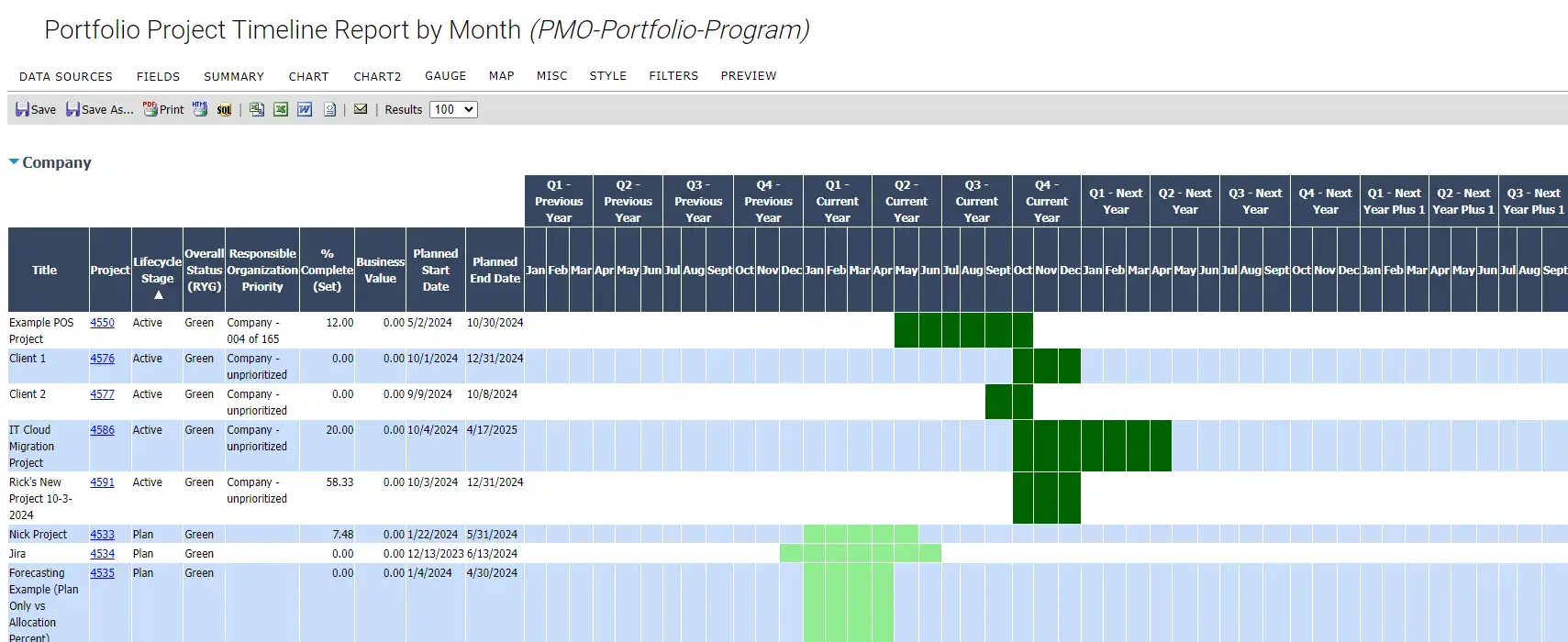
Granular project status data aggregated for historical and forward-looking analysis
Streamlining Project Portfolio Reporting with Prism PPM
Unstructured data is difficult to compile and analyze, which is why many tools built for project and task management fall short when it comes to project portfolio reporting.
Prism PPM is the leading project portfolio management tool built for strategic project and portfolio management with structured project data that aggregates easily for reporting to executives, stakeholders and project managers.
We empower the PMO to drive greater alignment with business strategy, more efficient project delivery, and better insights for the business. Drive portfolio performance: Reach out to us to get a demo.